Use this page when you want to keep papers and local documents available in the desktop workflow.
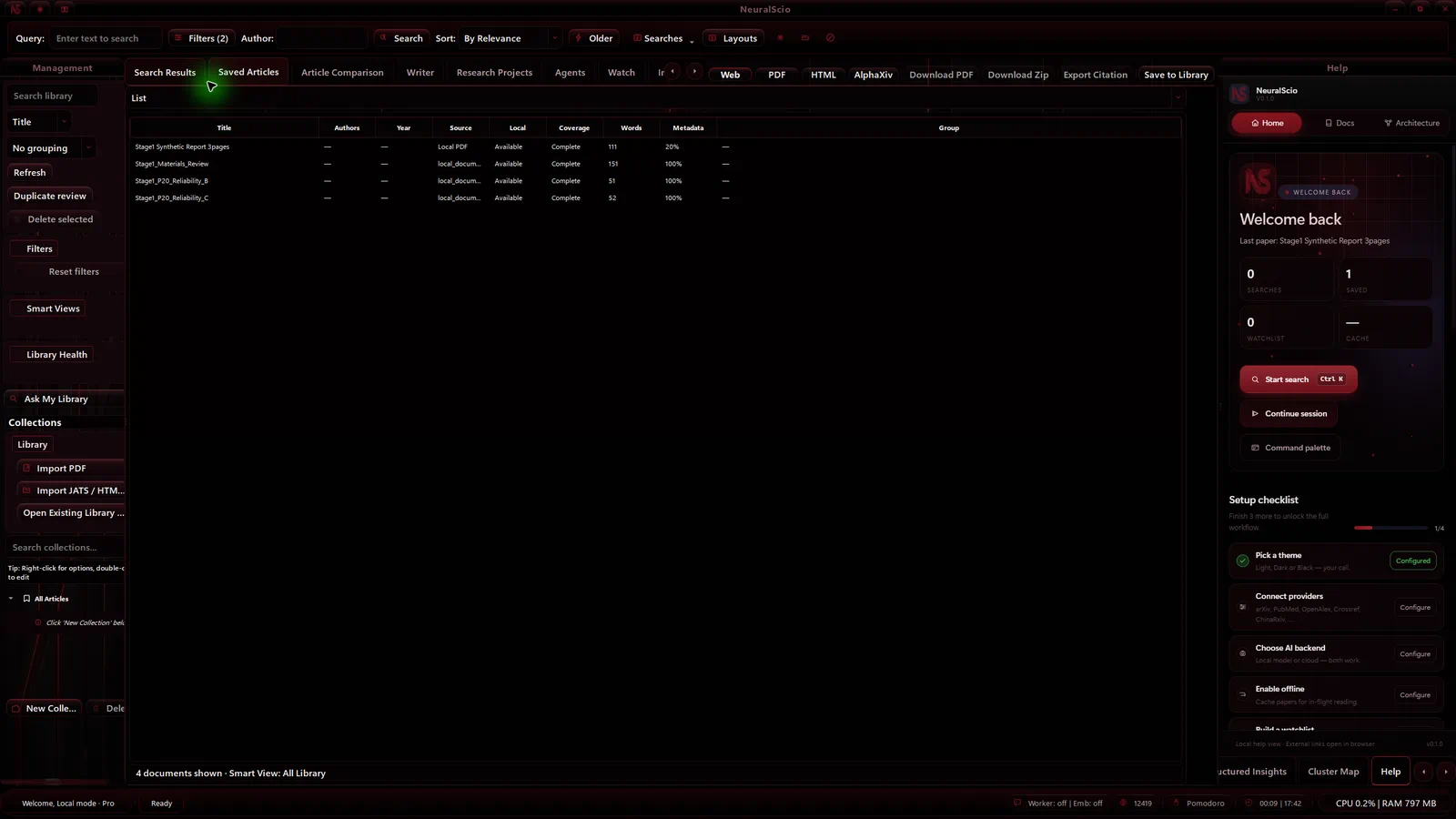
The exact import action and completion message can vary by desktop build. On the desktop build verified for this guide, the left sidebar exposes Import PDF and opens a metadata dialog for a local PDF.
When to use it
- Save a result from scholarly search.
- Reopen a saved paper without repeating the search.
- Open a PDF that is already on your machine.
- Continue from local material when it is available in the current build.
Find a saved item
Use the Search library field in the Library management panel to narrow the list by a title fragment. Search is case-insensitive. A query with no match shows an empty list state, and clearing the field restores the row. This field filters the Library list; it does not submit a scholarly search.
For imported HTML, the displayed title can be based on the filename and differ from the page's internal <title>. If the saved reading view appears to be missing extracted HTML text, keep the original file and verify the import before relying on it.
Workflow
- Search for a paper or open a local PDF from the desktop app.
- Save the paper when the result contains the metadata you want to keep.
- Use the library to reopen saved metadata and cached reading content.
- Add annotations only after confirming that the current document is the intended paper.
The exact set of buttons can vary by build. Use Interface Tour when a control is not visible.
Import and reopen a local PDF
- In the desktop app, select Import PDF in the left sidebar.
- Select Browse..., choose a local PDF, and review the Title, Author, Tags, and Notes fields in the import dialog.
- Select Import. Confirm that the row appears in Saved Articles with the expected title and author; a local PDF row is marked Local PDF and Available.
- Select the row and press Enter to open it in the PDF Reader. Check the title and rendered page before annotating it.
- To verify local continuity, close the app normally, relaunch with the same profile, and confirm that the row still opens.
Choosing a file is not evidence that import finished. Confirm the Library row and open it once before relying on the document. The same-profile smoke check described here does not establish cross-device sync or account sync.
In the verified desktop build, when a batch contains a failed file, the completion dialog keeps the imported and failed counts and lists each failed filename with its reason in the current UI language. It shows the filename rather than the file's full local path. Keep the original file until you have checked the result.
PDF import can enqueue local retrieval indexing when that feature is enabled. If your build exposes the AI Model Settings option Off (disable RAG), it applies to retrieval indexing; it does not disable every separately started AI action. The import result and any indexing status are separate things to check.
Saving a search result
- Open a result from Search and verify its title, author or identifier.
- Use the save action shown by the current build.
- Return to the Library and look for the saved record.
- Reopen it once before relying on it for an offline session.
Not every provider result has a PDF. Saving metadata does not grant access to a restricted publisher copy.
Data and network boundaries
The desktop has local-library and PDF-import implementation paths. This page does not claim an exact storage location, retention guarantee, or cross-device sync result; check Backup, Restore & Data Locations for the applicable build. Provider search and remote full-text retrieval need network access. A local file can be selected without searching a provider, but any later processing depends on the enabled feature path.
The app does not guarantee that every provider result has a downloadable PDF. See Data Providers.
What to keep and how to recover
Sync availability depends on the current Public Alpha build and account configuration. Keep the original PDF and any notes until you have reopened the Library item and confirmed its title and first page. If the row is missing or the title is wrong, record the app version, file type, action and visible message. Avoid repeated imports, cache resets or full Library deletion as a first step. See Sync & Cloud and Backup, Restore & Data Locations before moving or resetting local data.