Neural Writer is the native LaTeX writing surface inside NeuralScio. It keeps drafting close to the saved library, PDFs, citations, and AI assistant instead of sending synthesis work to a separate editor too early.
Writer actions and export formats depend on the desktop build and the local tools installed on your computer. Save a copy to a path you can identify before making substantial edits.
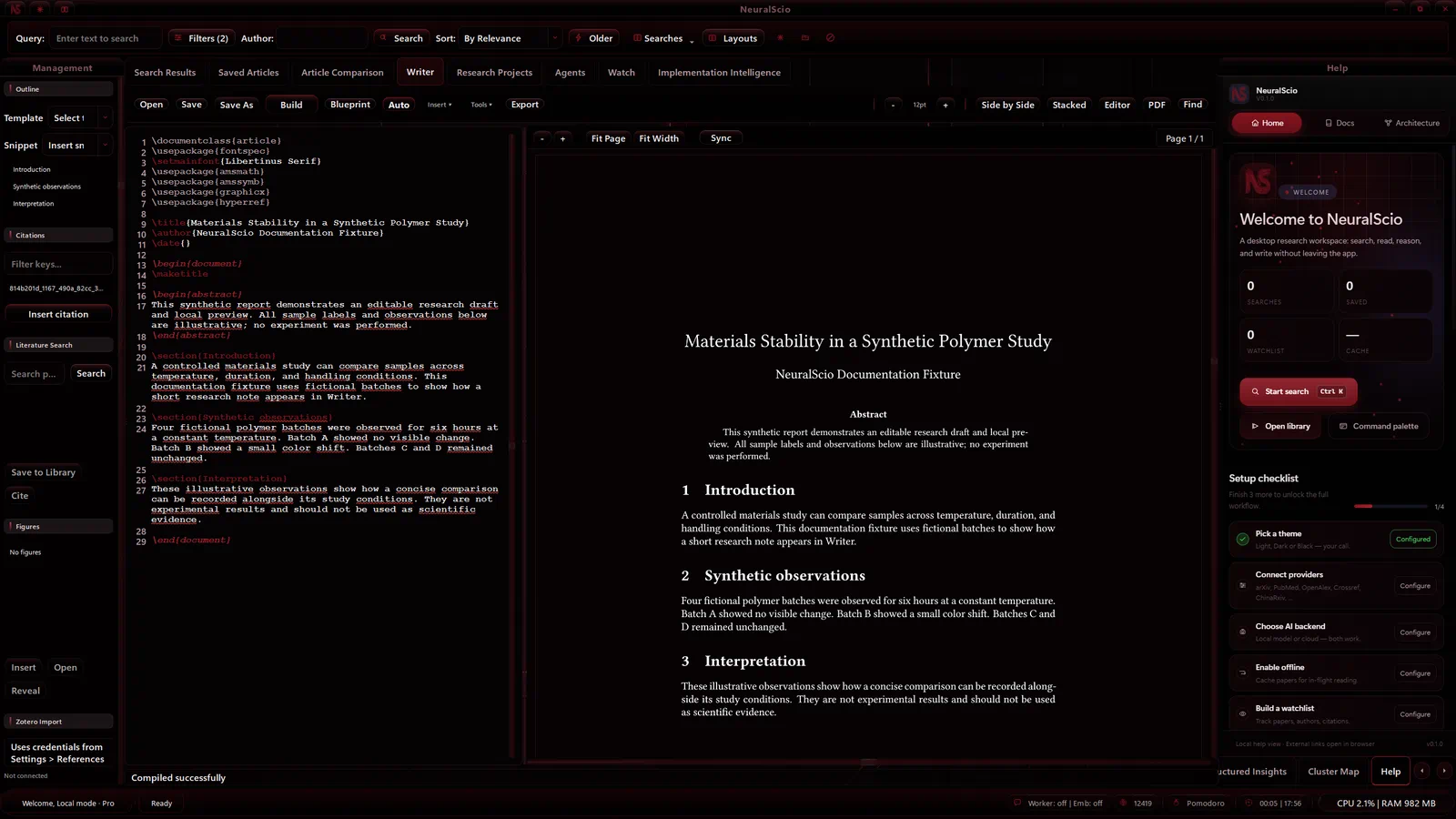
What Is Implemented
- QPlainTextEdit-based LaTeX editor with syntax highlighting and line-oriented editing
- bibliography sync from saved articles into a local
.bibfile - citation key autocomplete and citation insertion from the saved library
- manual compile controls and PDF preview in supported desktop builds
- PDF preview of compiled output when a local engine succeeds
- document stats, outline, snippets, search/replace, and publication checklist surfaces
- reference import by DOI and arXiv ID
- AI writing actions such as fix, expand, abstract, introduction, outline, paraphrase, simplify, formalize, fix citations, keyword suggestions, methodology draft, conclusion draft, and custom prompts
- export options for PDF and other source/document formats in supported builds; check required local tools and inspect each output before sharing
Engine And Tool Requirements
The compiler wrapper can use Tectonic, pdflatex, xelatex, or lualatex depending on what is installed. Export formats that rely on external tools need those tools available locally:
- Pandoc for HTML, DOCX, RTF, ODT, Markdown, and EPUB exports
zipfor Overleaf ZIP bundlestypstfor Typst exportpdftotextfor plain-text extraction from compiled PDF- Ghostscript for optional PDF-quality processing
AI Boundary
The Writer AI assistant generates LaTeX-ready snippets and document edits using the configured AI backend. It can use current document text, selected text, and source context where provided, but generated prose and citations still need review.
Citation help should use BibTeX keys from the saved library. Do not treat generated citations as valid unless the matching bibliography entry exists.
Formula And OCR Boundary
The confirmed surface is formula sketch/input support and equation insertion. Screenshot-to-LaTeX OCR should be treated as experimental unless a recognition backend and end-to-end UX path are configured and verified.
Workflow
- Save relevant papers into the library.
- Open Writer and start or open a LaTeX document using the visible action in your build.
- Save to a path you can identify before making substantial edits.
- Insert citations only after checking that each citation key has a matching bibliography entry.
- Use Compile when available and wait for a terminal status; confirm that the preview shows the expected document before relying on the result.
- Review the output PDF and bibliography before exporting or sharing.
Saving, compiling and exporting are separate actions. Check the visible status after each one, then reopen the source document and review any generated PDF before sharing it. The default save path and automatic compile behavior can differ by build.
Local editing and save/reopen
The Writer toolbar provides Open, Save and Save As. Use Save As to choose a local LaTeX source path; the file dialog filters to .tex files. Confirm the visible save status before closing the document. The editor context menu provides Undo and Redo, with Ctrl+Z and Ctrl+Y shown as their shortcuts. Check the source after each action to confirm the edit changed as expected.
To reopen a saved draft, choose Open and select the same .tex file. A tested Windows desktop build kept the local source available across a normal close and relaunch with the same profile; opening it again restored the source and a successfully compiled PDF preview. The preview depends on a supported local LaTeX engine, and automatic compile behavior can vary by build.
Export options and required local tools vary by desktop build; verify the generated file before sharing it.
Local and AI boundaries
Writer text is edited in the desktop application. A compile or export may invoke local tools such as Tectonic, pdfLaTeX, XeLaTeX, LuaLaTeX or other format tools when installed. AI writing actions use the backend configured for the build and may require network access and provider credentials; this guide does not run a model or grant permission to send document text to a provider.
Before using an AI action, check the selected backend and the text/context the action will receive. Treat generated prose and citations as drafts and verify them against the saved source documents.
If saving or compiling fails
Keep the source document. Check the selected output path and whether the required local tool is installed. For export, check the tool required by that format. Record the app version, action and visible message before retrying; see Backup, Restore & Data Locations before moving or resetting local data.
Related Docs
- Read AI Features for local/cloud model boundaries.
- Read PDF Viewer for reading and annotation workflow.
- Read Data Providers for where citation metadata comes from.