NeuralScio provides a PDF reading workspace in desktop builds that include the feature. The available controls depend on the build and the selected document.
The available PDF controls depend on the desktop build and the document that is open. Check the title and first page before searching or annotating; keep the original PDF available while you confirm the result.
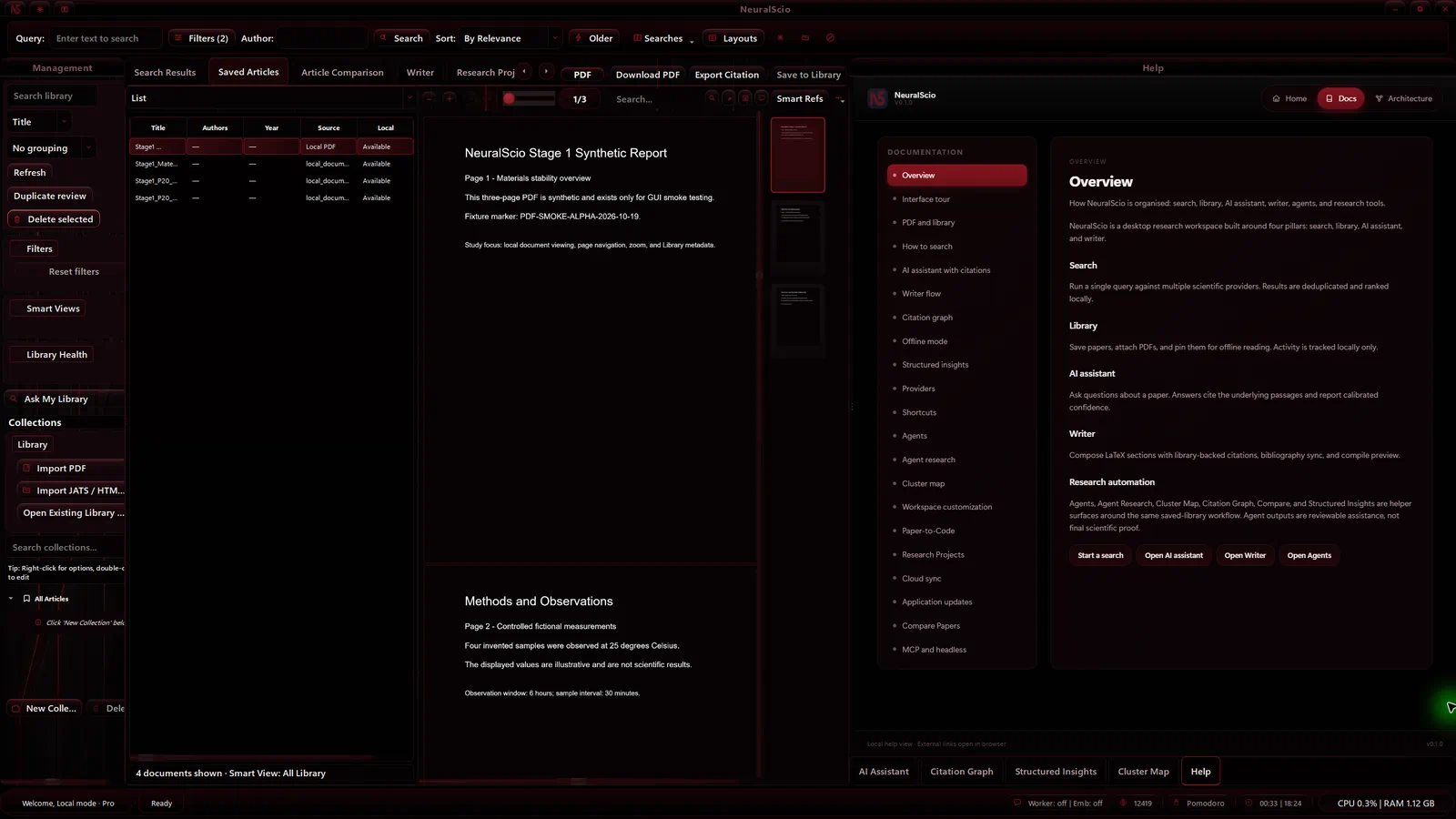
Core Capabilities
Reading and navigation
- continuous reading surface
- page thumbnails and page navigation
- search inside the open PDF
- outline-aware navigation where available
Annotation workflow
When annotation controls are available, you can use them to mark the document:
- highlights
- notes
- underlines
- theme-aware reading surfaces
Workflow hand-off
Depending on the build, the PDF workspace can connect to other research tasks:
- save papers into the library
- keep PDFs cached locally
- pass selected text into AI
- continue into citation and writing work without leaving the desktop app
Read a PDF
- Open a local or saved PDF using the action available in the current build.
- Check the title and first rendered page against the document you selected.
- Use the page slider and current-page/total-pages indicator to move between pages. Use Zoom in and Zoom out to change scale.
- Type a phrase in Search in document and press Enter. Matching text is highlighted in the open PDF.
- Add a highlight, note or underline only after confirming the document and page.
- Reopen the item before relying on annotations or cached content in another session.
On the verified desktop build, a three-page local PDF showed page labels 1/3 and 2/3 as the slider moved, the zoom button changed the rendered scale, and a local phrase search highlighted a match. This check covered reading controls and same-profile reopening; it did not verify annotation persistence or cross-device sync.
If a control is missing, check the installed build and the current document type. Reopen the document before relying on saved reading state or annotations.
If the reader is blank
Check that the source PDF opens in another reader, that the selected path still exists, and that the app is showing the expected item. Record the desktop build, file origin, action sequence and any visible error. Keep the original file and annotations; do not clear the Library or cache as a first step. For an HTML article, use Web Viewer.
Practical Boundary
The core PDF workflow is reading, annotation, cached access, and integration with the rest of the research workflow.
Offline Continuity
Local and cached reading may support offline continuity when the document is available on the device. Check that the page and annotations reopen before relying on them offline.
See Offline Mode for the actual boundary.
Related Docs
- Read Scholarly Search for how papers enter the workflow.
- Read AI Features for passage-level analysis.
- Read Neural Writer when the workflow shifts into synthesis.
If annotation or cached state is missing
Keep the original PDF and note the app version, file origin, action and visible error. See Troubleshooting before changing local data.